TikTok Profile Viewer: Look Up Any Public Profile, No Login
Use this free online TikTok profile viewer to see any public account's bio, key stats and recent videos in seconds. Enter a username or profile link. No account, no password, no app to install. Your own TikTok account stays out of it completely.
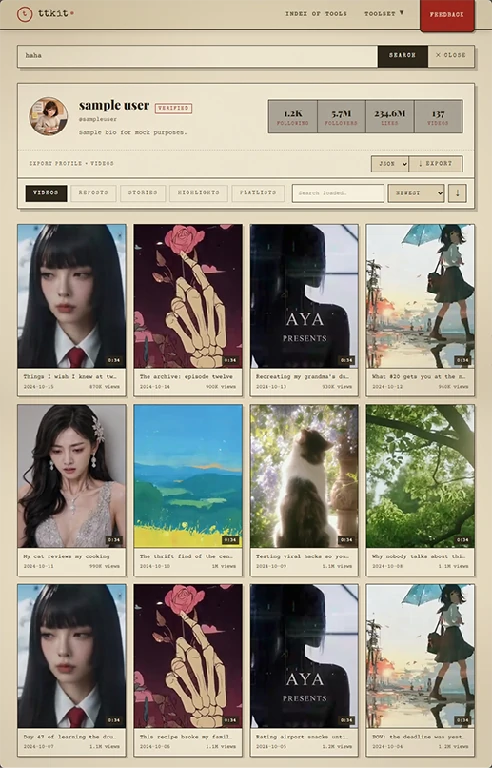
(bio, stats, videos)
What You Can See in a TikTok Profile
Search any public account and get the full profile in one clean view, without opening the app or signing in. Here is exactly what shows up, so you know whether it's what you need before you try it.
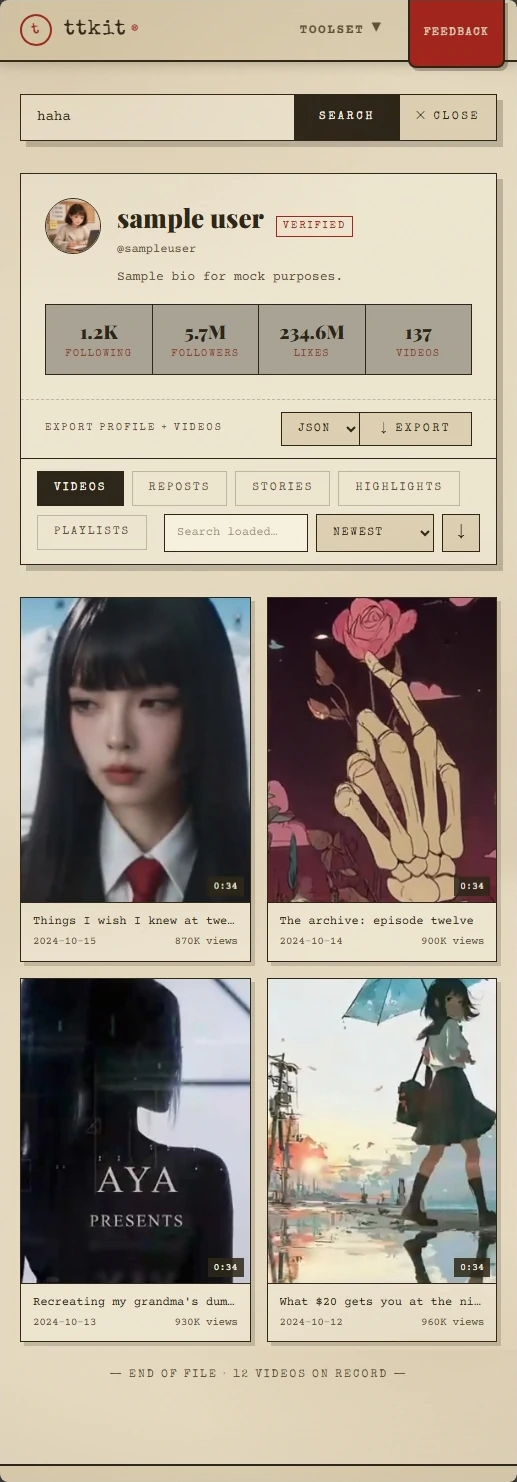
Profile Basics
You get the full-size profile picture (PFP), display name, @username, verified badge and the complete bio. If the creator has added a website or link, it's shown as well, along with any public contact details they've put in their bio. It's the same information as the in-app profile, without the cramped layout.
Key Stats
See followers, following, total likes and total video count at the top. These four numbers are usually enough for a first judgment: how big the account is, how active it is, and whether the audience actually engages. Compare likes to followers to spot accounts with a loyal audience, or ones with inflated numbers.
Recent Videos
Browse the account's recent public videos with the numbers that matter for each one: views, likes, comments and shares, plus the posting date and caption. You can see at a glance how often they post and which videos did well, instead of tapping through them one by one.
What's Not Included
Read before requesting accessThis TikTok account viewer only shows what TikTok shows publicly. That means:
- Private accounts can't be viewed.
- Follower and following lists aren't available.
- Who viewed a profile isn't available, here or anywhere else.
- Deleted or banned accounts can't be retrieved.
Any site that claims to bypass these limits is misleading you. Knowing the boundaries up front saves you time.
What You Can Do With a TikTok Profile
Looking is only the start. Once a profile loads, you can work with the data directly instead of scrolling and taking notes by hand.
Search and Sort TikTok Videos
Search within an account's videos by keyword, then sort by views, likes, comments, shares or date. Want an account's ten best-performing videos? One click. Want to see only what they posted last month? Sort by date. This is the fastest way to find out what actually works for an account, rather than guessing from the first few videos you see.
Export TikTok Profile Data to CSV or Excel
Export an account's video list with all stats in one file: caption, post date, views, likes, comments, shares and video link. The CSV file opens directly in Excel or Google Sheets, so you can filter, chart and share it with your team. Exporting 100 videos by hand takes an afternoon. Here it takes a click.
Download TikTok Profile Picture (PFP)
The profile photo in the app is a small circle you can't save. Here you can download any public TikTok profile picture (also called a PFP or avatar) in full resolution, ready to use for reference, mood boards or account research.
Download TikTok Videos and Audio
Found a video worth keeping? Download it in HD without a watermark, or extract the audio as an MP3. This opens our dedicated TikTok Video Downloader with the video already loaded.
→ TikTok Video DownloaderRead and Export TikTok Comments
Open any video's comments in one readable list, search them for keywords, and export them to a file. Useful for understanding audience reactions, finding common questions, or keeping a record. This opens our TikTok Comment Viewer.
→ TikTok Comment ViewerWho Uses This TikTok Profile Viewer
The same tool serves very different jobs. These are the most common ones, with what each person actually ends up doing.

Taking a Quick Look Without a Trace
You saw a username in a comment, a screenshot or a friend's message, and you're curious. You don't want to follow, like or leave any footprint. Enter the username, read the bio, scan the latest videos, and close the tab. You can view a TikTok profile anonymously: nothing is recorded in your account and no one is notified.

Vetting a Creator Before a Brand Deal
Before you send an offer, check the things a media kit can hide. Look at the follower count against average views to see if the audience is real. Sort by views to see whether their best video was a one-off or part of a pattern. Check how often they post, and whether the comments look like genuine conversation. Then export the numbers to attach to your decision.

Researching Competitors or a Niche
Take a competitor's account, sort their videos by views, and study the top ten: what topics, how long, what style of caption. Then export their last 100 videos into one sheet and look for patterns. Doing this from your work account would quickly fill your For You feed with that niche. Doing it here doesn't touch your feed.

Building a Report or Shortlist
Agencies and analysts often need the same data for many accounts. Look up each profile, export its video stats to CSV or Excel, and combine them in a spreadsheet. No copying numbers by hand, no screenshots, no mistakes from retyping.

Keeping Reference Material
Designers, editors and social media managers often need to save a profile picture, a standout video or its audio for reference. You can do it from the same page, without hunting for separate tools.
Why Use This TikTok Profile Viewer
You get to look at the profile. Your TikTok account never takes part.
Everything below follows from one simple fact: you never log in, so your account is never involved. That isn't a promise about settings. It's how the tool works.
The Creator Isn't Notified
Notifications and "viewed your profile" features are tied to accounts. Since no account of yours visits their profile, there's nothing to tell them about. They see no name, no icon and no visit.
Nothing Appears in Your Account
Your watch history, search history and activity log only record what your account does. Because your account isn't used, none of them change. If you've ever cleaned up your history after looking someone up, you won't need to again.
Your For You Feed Stays Yours
TikTok learns from what you watch and search. Look up three competitor accounts from your own profile, and your feed starts pushing similar content for weeks. Lookups here happen outside your account, so your recommendations stay the way you built them. This matters most if your account is also your work.
We Don't Keep Your Searches
We don't ask for a password, don't need an extension, and don't require an install. We also don't store a list of the profiles you look up.
Tip: if you open a video on TikTok itself while logged in, that counts as activity on your account. Use the in-page preview to stay out of your history.
How the TikTok Profile Viewer Works
Three steps, about ten seconds, on phone or desktop.
Copy the Username or Link
In the TikTok app, open the profile and tap Share, then Copy Link. Or just type the @username if you already know it. Both work, with or without the @.
Paste It in the Search Box
Paste it into the box at the top of this page and press View Profile. You don't need to select a region or pick an option first.
Read, Sort, Export and Download
The profile loads in seconds. Browse the stats and videos, sort by what matters to you, or use the export and download tools for anything you want to keep.
Tips for Better Results
- Check the username spelling. TikTok usernames can include underscores and periods, and look-alike characters are common.
- If a profile doesn't load, the account may be private, renamed, banned or deleted.
- For the most accurate numbers, search again after an account posts something new.
More TikTok Tools From ttkit
Need something more specific than a profile lookup? Each of these has its own page and works the same way: paste a link, get the result, no login.
TikTok Video Downloader
Download any public video in HD without a watermark, ready to share or edit.
TikTok to MP3
Extract the audio from a video as MP3, M4A or WAV, for a ringtone, reference track or editing material.
TikTok Comment Viewer
Read a video's comments in one place, search and sort them, and export to CSV.
TikTok Story Viewer
View public Stories anonymously, and download them before they disappear after 24 hours.
TikTok Highlights Viewer
Browse an account's Highlights without logging in, and download the ones you want to keep.
Look Up a TikTok Profile Now
Paste a username or profile link and see everything public in seconds. Free, no login, and your own account stays untouched.
FAQ
Do I need to log in to view a TikTok profile?
No. You don't need a TikTok account or any account with us, and we never ask for your TikTok password. If a site asks you to log in with TikTok to view a public profile, close it.
Can I view a TikTok profile anonymously?
Yes. Profile view notifications depend on logged-in accounts. You aren't logged in, so no account of yours visits their profile and the creator isn't notified.
Will the creator know I viewed their profile?
No. There's no account of yours for TikTok to report, so they see no name, no icon and no visit.
Will this affect my TikTok recommendations?
No. TikTok builds recommendations from the activity of your account. Your account isn't used here, so looking up a profile has no effect on your For You feed.
Will it show up in my TikTok history?
No. Nothing is added to your watch or search history because everything happens outside the app and your account. The one exception is when you open a video on TikTok itself while logged in. That's activity on your account, so use our in-page preview if you want to stay out of your history.
How do I download a TikTok profile picture (PFP)?
Enter the username or paste the profile link, open the profile, and download the profile picture in full resolution. It works for any public account, with no login.
Can I export a TikTok profile to CSV or Excel?
Yes. You can export an account's video list with caption, date, views, likes, comments, shares and link as a CSV file. It opens in Excel, Google Sheets and Numbers.
Can I search and sort a TikTok user's videos?
Yes. Search by keyword, then sort by views, likes, comments, shares or date to find an account's best-performing videos quickly. This is free.
Can I view a private account?
No. Only public profiles can be viewed. Private content is visible only to approved followers, and no legitimate tool can bypass that. Be careful with sites that say otherwise. Many are scams or try to collect your login.
Can I see who viewed my TikTok profile?
No. TikTok doesn't share that information with outside tools. Be wary of any site that says it can show you.
Why does it say "user not found"?
Usually one of four things: the username is misspelled, the account is private, the user changed their username recently, or the account was banned or deleted. Copy the link directly from the app to avoid typos, then try again.
Is the data up to date?
Stats and videos are fetched when you search, so you see what is publicly shown at that moment. Numbers like views and likes change constantly, so a later search may show different figures.
Is it free? Are there limits?
Yes. Viewing profiles, searching and sorting videos, downloading profile pictures and exporting to CSV are all free. No account, no subscription, no paywall.
Does it work on iPhone, Android and computers?
Yes. It runs in any modern browser on phone, tablet or desktop. There's nothing to download, and no app or extension to install.
Do you store my searches?
No. We don't keep a history of the profiles you look up.
Is this legal and affiliated with TikTok?
ttkit is independent and isn't affiliated with TikTok. It only shows information that is already publicly available. Please respect creators' privacy and copyright, and don't use it for harassment, impersonation or copying others' work.