
TikTok Stickers
Download stickers shared in TikTok comments, including funny reactions, expressive stickers, and visual responses. Find the ones you like, preview them, and save them to your device for later use.
Download TikTok stickers, GIFs, and images with TTKit. Paste a video link to find and preview available media, save individual files, or download everything together in a ZIP. No TikTok login required.
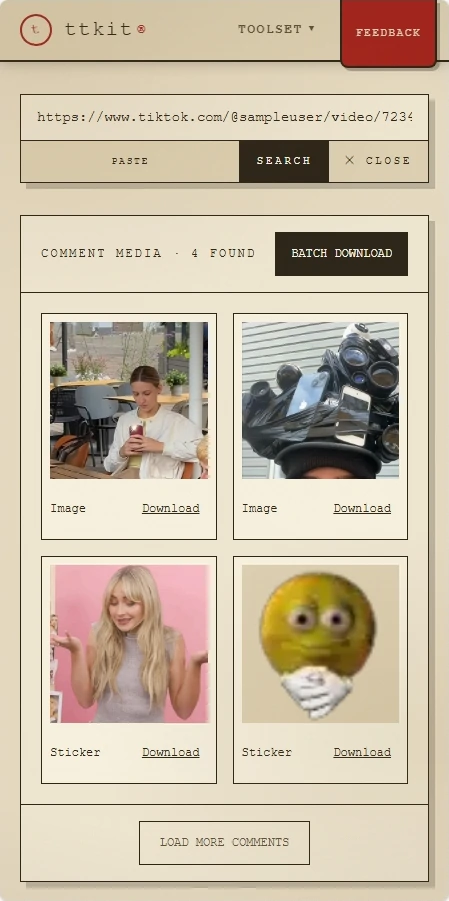
TikTok videos can have more than just text in their comment sections. Users share stickers, animated GIFs, memes, photos, and other images. With TTKit, you can find these different types of media and save the ones you like.
Download stickers shared in TikTok comments, including funny reactions, expressive stickers, and visual responses. Find the ones you like, preview them, and save them to your device for later use.
Save animated GIFs from TikTok video comments. Whether it's a hilarious reaction, a funny expression, or a meme worth sharing, you can preview available GIFs and download your favorites.

Find pictures shared by TikTok users, including memes, screenshots, photographs, illustrations, and other visual content. Preview the available images and save the ones you want to keep.
TikTok comments are constantly moving. You might find a GIF that's perfect for your next conversation, a picture you'd love to use as your wallpaper, or a visual that would work well in your next creative project. Once you scroll past it, finding that exact item again can be difficult. Downloading it means you can keep what you like instead of relying on finding it again in the original conversation. Here are some ways to use the stickers, GIFs, and images you find.

Found a reaction GIF that perfectly expresses how you feel? Or a funny sticker that's just right for replying to a friend's message? Save these reactions so they're ready whenever you want to use them. Keep your favorite GIFs, stickers, and memes for chatting, replying to comments, or exchanging funny reactions with friends on platforms that support them.
Sometimes you come across a picture that you simply don't want to lose. It could be a beautiful landscape, a cute animal, an illustration, or an image that catches your eye. Download it to your device and use it as your phone or desktop wallpaper, keep it in your photo collection, or share it with friends. You won't have to search through the original TikTok comments to find it again.
Found a GIF that would make a great reaction in your next video? An interesting sticker for an edit? Or an image that gives you an idea for a new design? Save these discoveries as visual references for future projects. Video editors, graphic designers, and content creators can use them as inspiration when working on memes, short-form videos, graphics, and other creative content.

TikTok comments can contain some surprisingly funny memes and visual jokes. When you find one worth sharing, download it before it gets buried in the conversation. Keep your favorite memes for sharing with friends, using as references, or creating your own versions.

Not every image is a meme or a wallpaper. You might find a useful screenshot, a product photo, an interesting illustration, or a picture that provides information worth revisiting. Save these images to your device so you can refer to them later, without having to find the original video and scroll through its comments again.
Downloading TikTok stickers, GIFs, and images with TTKit takes just three steps.
Open the TikTok video containing the stickers, GIFs, or images you want to save.
Tap the Share button and select Copy Link.
Open TTKit's TikTok Sticker Downloader and paste the copied video URL into the input box.
Click the button to start extracting the available media from the video's comments.
Browse the extracted stickers, GIFs, and images. Preview them to find the ones you want to keep.
Download individual files or save all available media together in a ZIP file.
That's it! Your files will be saved to your device.
Finding a sticker or picture in a busy TikTok comment section can be frustrating. Saving everything manually takes even more time. TTKit makes TikTok sticker download easier by bringing available comment media together in one place.
See the available stickers, GIFs, and images before saving them. You can browse the results and choose exactly what you want instead of downloading files blindly.
You don't have to download everything if you only want one particular file. Select your favorite sticker, GIF, or image and download it individually.
Found lots of interesting media in one video? Download all available stickers, GIFs, and images together in a ZIP file instead of saving them one by one.
You don't need to sign in to TikTok or connect your account. Simply paste a publicly accessible video link and start finding the media you want to save.
Paste a video link to preview and download available stickers, GIFs, and images.
Copy the link of a TikTok video, paste it into TTKit's TikTok Sticker Downloader, and start extracting. Preview the available stickers and download individual files or everything together in a ZIP.
Yes. TTKit can extract available animated GIFs from TikTok video comments. Preview them and download the ones you want to keep.
Yes. You can find and download available pictures shared in a video's comments, including photos, memes, screenshots, and illustrations.
Yes. After extracting the available media, you can download everything together in a ZIP file instead of saving each sticker, GIF, or image individually.
No. TTKit does not require a TikTok account or login. Just paste a publicly accessible video link to get started.
Yes. You can preview the extracted stickers, GIFs, and images before deciding which files to download.
The video and its comments must be publicly accessible, and the relevant media must be available for extraction. Private, deleted, restricted, or otherwise inaccessible content may not be available.
Downloaded files are saved through your browser's normal download process. You can find them in your device's Downloads folder or the location selected in your browser settings.
You can use downloaded files for personal reference and other permitted purposes. However, downloading publicly accessible media does not automatically grant permission to redistribute it or use it commercially. Make sure you have the necessary rights before publishing or using someone else's content.